
Usage
Usage analytics
See the tokens and cost behind your agents by day, provider and model, and where every number comes from.
Codz reads each provider’s own record of the work on this Mac and turns it into tokens and cost by day, provider and model. The Usage page shows a range of days, the Models page one day in detail, and Overview today at a glance.
Where the numbers come from
Everything is read on this Mac. Nothing is estimated where a provider says what happened, and nothing is invented where it says nothing.
| Provider | Tokens | Cost |
|---|---|---|
| Claude Code | Claude Code’s session transcripts in ~/.claude/projects | API list-price equivalent |
| Codex | Codex’s session logs in ~/.codex/sessions | API list-price equivalent |
| Cursor | Your Cursor account’s usage, while the Cursor app is signed in on this Mac | Reported by your Cursor account |
| OpenCode | OpenCode’s database in ~/.local/share/opencode | OpenCode’s own figure for each message |
| OpenRouter | Codz’s record of every request it sends through OpenRouter | What OpenRouter charged |
| DeepSeek | Not collected | None |
Each dollar figure carries its source:
| Looks like | Means |
|---|---|
$4.20 | The charge the provider reported (OpenRouter, OpenCode) |
$4.20 reported | The cost your Cursor account reported |
~$4.20 est. | What the tokens would cost at standard API list prices. Claude Code and Codex report no charge, and this isn’t what your subscription costs. |
— | No figure Codz can stand behind, such as a model with no list price |
On the Usage page, a total that includes a model without a price is shown with ≥, and the page says how many models have none.
Cursor: account usage or context
Cursor’s tokens and cost come from your Cursor account, so they appear only while the Cursor app is signed in and its usage service answers. When it doesn’t, Codz shows how full each working Cursor chat’s context window is instead, marked Not billed, and never makes up a token or cost total. Cursor’s account usage has no project folders, so on the Projects section it stays Not attributed to a project.
The Usage page
Open Usage from the account menu under your name, or press ⌘4.
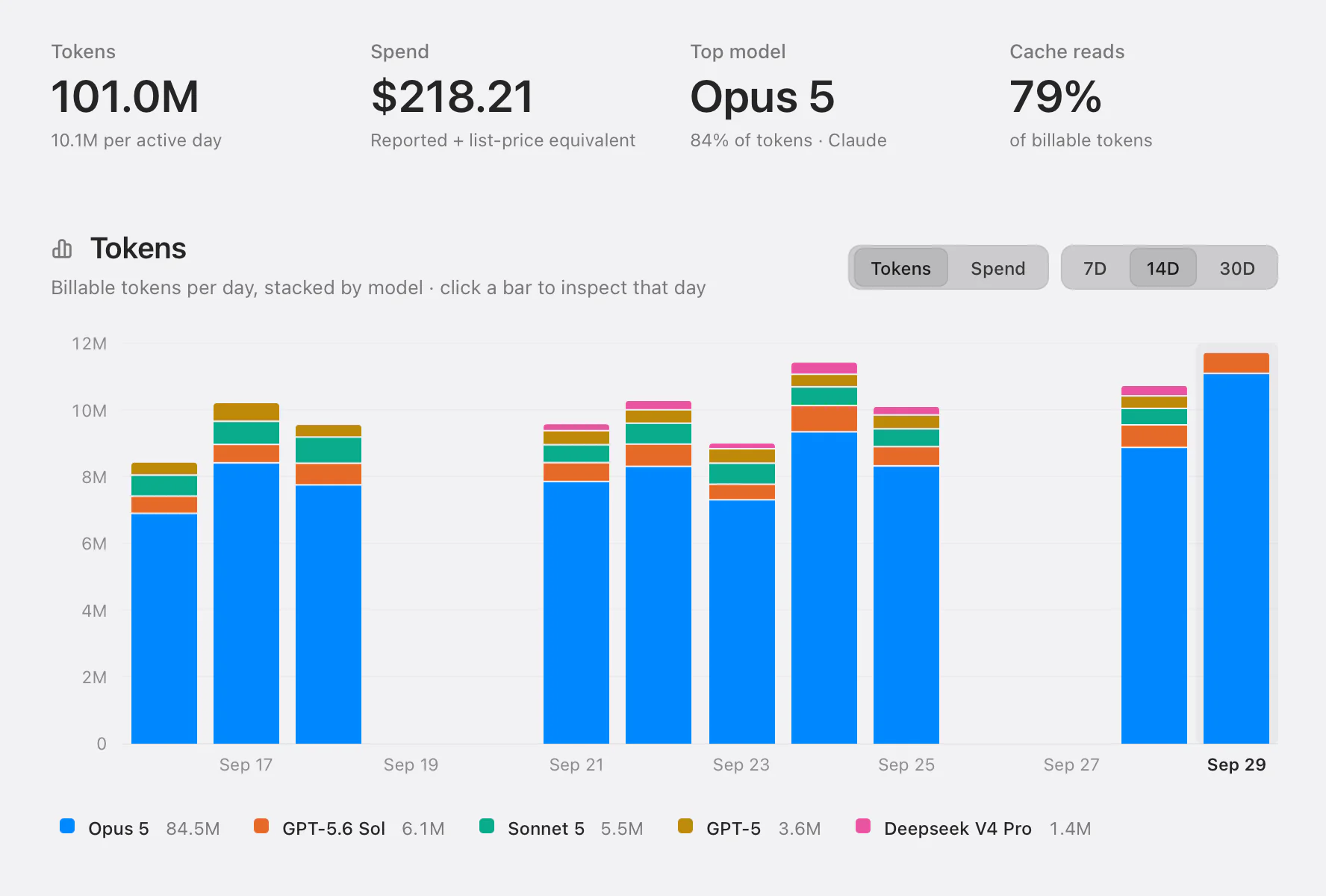
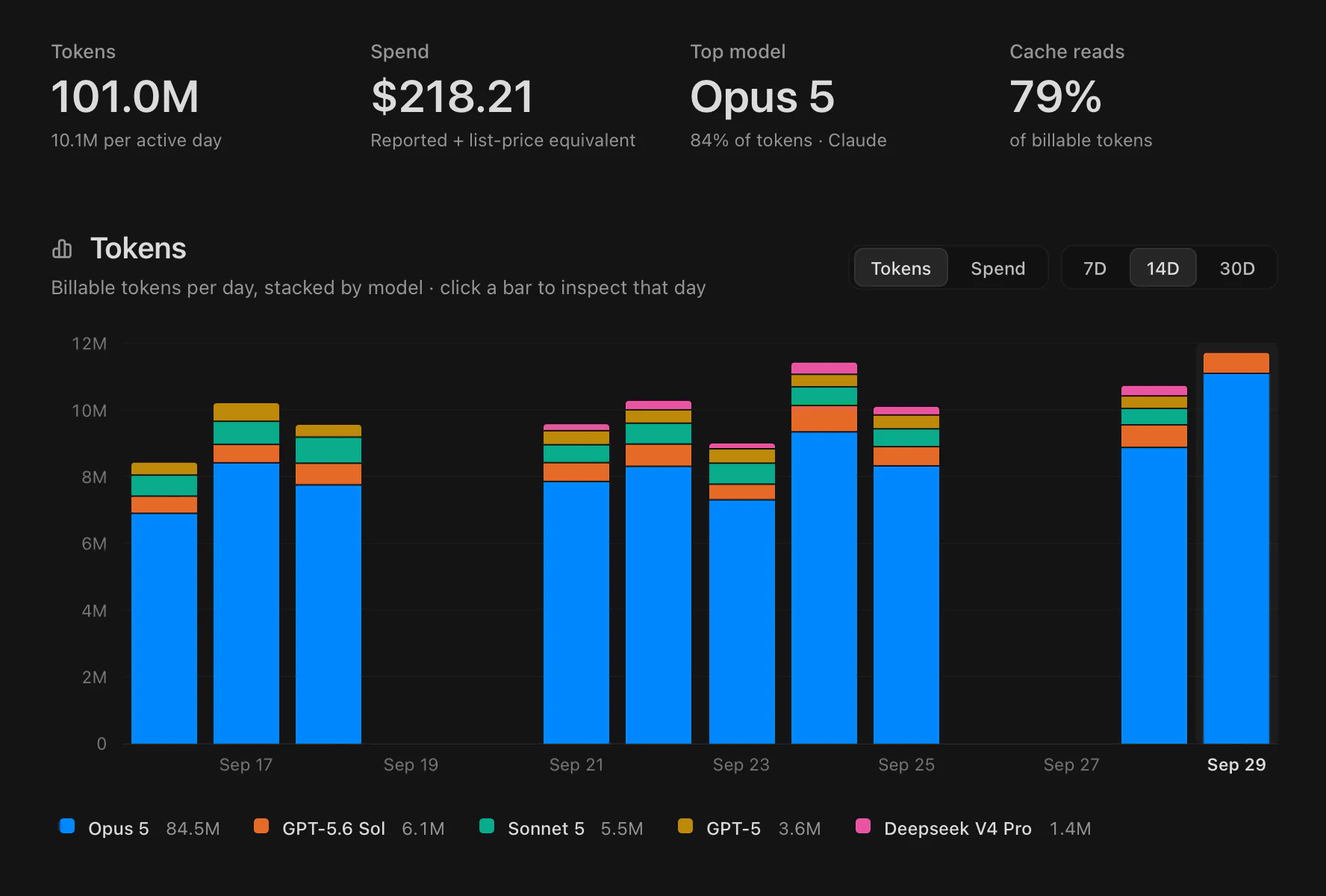
From the top:
- Figures for the range: Tokens (with the change against the same number of days before, or the average per active day), Spend, Top model and its share, and Cache reads, the share of billable tokens served from the prompt cache.
- The chart: billable tokens per day, stacked by model. Choose 7D, 14D or 30D, and Tokens or Spend once the model history is read. Click a model in the legend to hide or show it, and click a bar to inspect that day.
- Leaderboard: the top models by tokens over the range, each with its change against the days before, or New.
- Providers: each provider’s share of tokens per day.
- Capacity: your live plan windows and where they are heading. See Plan limits.
- The selected day: each model’s tokens, cost and share of the day. Click a model for its tokens hour by hour, or All models for the Models page.
- Projects: the day’s billable tokens per project, matched by the folder the work ran in where the provider records it. You need at least one project for this section.
The range sections follow the chart; the day sections follow the day you pick. Capacity is always live.
The first time you open Usage, Codz reads your model history from the providers’ logs, which can take a while on a Mac with a lot of it. Until then the chart is stacked by provider and the model figures say Reading model history…. Codz keeps what it read between launches, so later visits are quick.
Pick a day
With Pro, Overview, Usage and Models show a day picker in the header: Previous day, Next day, the date (click it to pick a day from a calendar) and Today to jump back. Beside it, a short line says where the day’s numbers come from and how fresh they are.
The day you pick carries across all three pages and the menu bar, which then reads “tokens yesterday” or “tokens on” the day. While you’re on another day, the widgets stop updating until you come back to today.
The Models page
Models (⌘5) is one day’s billable models in a table: the provider, the model, the total, the raw cost, and input, output, cache reads, cache writes and reasoning tokens as the window has room for them. Click a column heading to sort by it. A bar on each row shows its mix of token kinds, and the last row totals the day.
Click a row for Hourly usage: that model’s billable tokens hour by hour, in local time.
Codex and OpenRouter count cache reads and reasoning inside input and output, so their total is input plus output, not the sum of the columns.
Overview
Overview (⌘1) leads with Working, Usage, Raw cost and a plan meter: Cursor’s cycle when Cursor reports one, otherwise Claude’s 5-hour window, otherwise Codex’s fullest window. Below them are the agents working now, the day’s usage and sessions per provider, the top models, and the last 14 days with a link to Usage.
Without Pro, Overview keeps Working, the plan meter and the working agents, and shows Usage analytics is part of Codz Pro where the usage panels would be.
Menu bar, widgets and CLI
- The menu bar popover shows the day’s tokens, their cost and the tokens hour by hour.
- The Tokens Today widget shows today’s tokens and cost by provider, and the last 14 days.
codz usageprints one day’s usage,--day YYYY-MM-DDpicks the day, and--jsonadds acost_sourcefor each provider:provider_reported,account_reportedorapi_list_price_estimate. See Commands.
Questions
The pages show zeros, but my agents have been busy. macOS may be blocking Codz from reading the providers’ files. If Codz shows “macOS is blocking Codz from reading some agent data on this Mac.”, click Fix, or turn Codz on in System Settings ▸ Privacy & Security ▸ Full Disk Access.
Cursor shows context instead of tokens. Sign in to the Cursor app on this Mac. Codz reads Cursor’s account usage through that sign-in.
Why doesn’t my Claude or Codex cost match my bill? The figure is what the same tokens would cost on the provider’s API at list price. A subscription is billed differently, so treat it as a measure of how much work was done.
Spend shows ≥ or —. At least one model has no list price Codz recognizes, so its tokens are counted but not priced.
codz usage says it’s part of Codz Pro, but I’m on Pro. The CLI uses the plan the Codz app last recorded. Open Codz and check that Settings ▸ Account shows your plan, then run it again.